The way Mobile Safari handles <input type="file" /> is something that really winds me up:
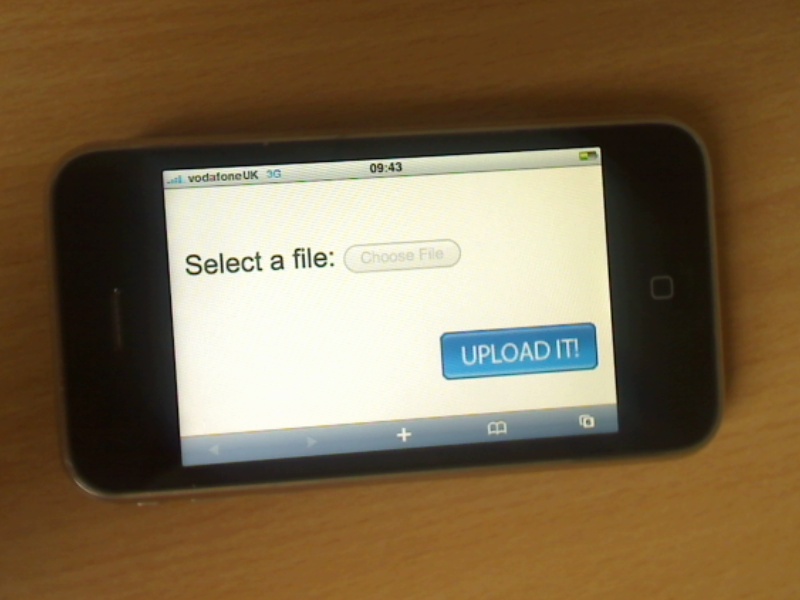
File upload isn’t possible from Mobile Safari. My beef today isn’t with this fact – it’s with the UI design. To show the ‘choose file’ button greyed out like this is inherently confusing. To grey something out is to say that “in some circumstances, this control will be active”. On today’s iPhones, this button will never be active. Tapping the button does nothing to clarify this. Nowhere is an explanation given that “Actually, you can’t upload files from Mobile Safari. ”
I’ve got an idea of a solution in my head – but I’d love to know what you think.
Edit 30-Aug-2012: comments are now closed.
When the user clicks ‘choose file’, a photo of an android handset should appear, with a message stating ‘YOU SHOULD HAVE BOUGHT ONE OF THESE’ :-)
Lots of websites can tell if you are browsing from an iPhone surely the best option is to remove the entire option with an iPhone version of the site, or change it to a friendly message saying “this option is not available on the current platform”
I’d say “In some circumstances, this control will be active” is actually accurate, those circumstances being in the distant future versions :-)
Why they don’t just open the Photo Gallery is beyond me.
@Duhmcah – True, but this involves you, the web designer, doing extra work, rather than Apple fixing up Mobile Safari to be less confusing.
@Brandon – That’s a start, but what if you want to upload other file-types?
@Alex – Yes, perhaps in one possible future, this message will be accurate, but that’s a bit Star Trek isn’t it?
@Anon Coward
Yeah, they totally should put it like this:
Select a file: … oh, wait, you can’t do that. Go get yourself an Android, loser.
Apple loves to hedge their bets like this. Having the button say “you can’t upload at this time” is admitting a flaw in their design. So they don’t admit it (just like Jobs stalling for *years* about talking about the lack of Flash and the reasoning behind it)
My first idea would be to enable uploading. Heh. But other than that, I’d say … keep the button ghosted out, but clicking it opens up a dialog that explains that file uploading isn’t possible in mobile safari.
BUT! Apple are geniuses, so, let me take a different approach:
Perhaps Apple tested it in its current form and discovered that it only really bothered UX designers like us, and so didn’t rev it to be better.
I don’t think Apple does user testing, though.
I was thinking the same thing – keep the button greyed out, then have an alert dialog that appears, but this does seem distinctly un-Appley. Initially I’d thought about showing a message on the page, but of course this would screw up the layout of most web pages.
Lack of a general purpose “file manager” on the iPhone is a real problem for certain kinds of webapps. I spend a lot of my time working on a job board platform – where the user normally has to upload their resume (.doc/.pdf/etc) as part of a job application. I’m currently looking at a solution that involves redirecting users to use a desktop/laptop computer to upload a CV into their account if they haven’t already got one in there. I’d prefer not to have to do this.
My first instinct is to have it open the photo gallery. My second one is a multiple option dialog like when you hold your finger over links, and give options like “Photo Gallery” and “Attach a File from URL” and “Cancel” or something of that nature.
I would simply replace the button with an error message saying this feature is not supported currently on mobile Safari.
What if your web apps purpose to upload files? What do you do then?
Is there a way with HTML/CSS/JS to role your own file upload link?
Yep this is really easy on Android to use HTML input field to locate an image from the gallery.
Not so easy on ipod touch.
I think they create these shortcomings on purpose so developers have to learn Obective-C and build native apps instead of being able to easily role a web app.
Do you have any suggestions for making a file uploader in js?
see these:
http://picupapp.com
http://www.cliqcliq.com
“Yep this is really easy on Android to use HTML input field to locate an image from the gallery.”
I would really like to know how to easily do this! I need a working image upload field for the Android browser.
Here is one way of doing it. It may need some work, but it is on the right track.
http://picupapp.com/index.html
Try Opera Mini. Upload actually works and when you click it, it takes you directly to pictures. I don’t know why apple is letting themselves be out done. Also Opera runs every request thru their server first crunching data upto 90% saving huge amounts of data. Their are some other things I like and don’t like tho.
Download the “picup” app from the app store to make the upload button take you to the photo album.
You can also use filepicker.io. While the safari local upload is still greyed out, it’s a developer plugin that allows you upload files from the cloud, like Dropbox, Box, Facebook, gmail so your users can use your website.
Full disclosure: I’m one of the authors.
Its ridiculous for a start. The way Android handles it is fine and doing that is well within Apple’s capabilities.
Its really annoying when Apple say.. lets everyone move to standard HTML and then doesn’t support standard HTML.
By not supporting this tag it not only forces people to write Apps but of course, those Apps can only be sold through the App store where they get their 30%.
And even if those apps are free, the publisher is still paying $99 per year to develop them.
Another thing that makes developers do apps and not pure HTML is mobile Safari’s inability to remove the annoying bottom nav bar unless you save the page to a desktop icon.
Its all part of Apple’s evil master plan to extort money from everyone IMHO.